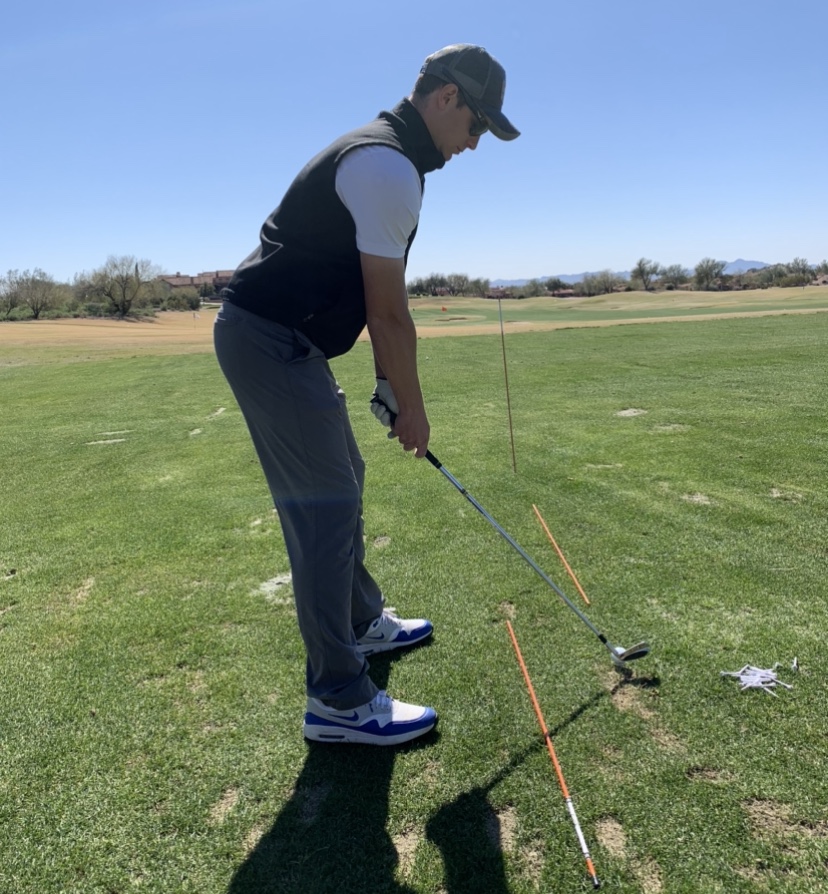
This is a super basic guide on how to film a golf swing properly, and set up your phone or camera for a professional golf swing analysis. Use this simple step-by-step guide for your next practice session!
Down-the-Line Video Setup:
- Place an alignment stick or golf club parallel to the target line (or ball line) just off your toes.
- Set your phone, iPad, or camera (ideally on tripod) roughly 10 feet back from yourself and ensure it’s far enough back to capture the full golf swing, including the clubhead at the top of the backswing.
- Adjust the tripod or height of your camera lens to about elbow high and aim your camera lens directly down the alignment stick. Notice in pictures below, the exact center of the frame is located roughly at this location.
- Hit record and take a golf swing! Pro tip: Always hit a golf ball for swing analysis as swinging through air will not portray the actual moves you make when you are striking something.


Face-On Video Setup:
- Once again set your phone roughly 10 feet away, and this time perpendicular to your target line (or ball line). Pro tip: Use an alignment stick to reference ball position and ensure perfect camera positioning.
- Ensure the phone is far enough away to film the golf club throughout the entirety of the golf swing (including: backswing, top of swing, and follow through).
- Have the height of the phone and tripod about the same as down-the-line, about even with elbows.
- Hit record and take a golf swing! Pro tip: crop and trim your videos for ease of use and analysis from a golf coach.
Need help with your swing? Get personalized 1-on-1 coaching directly from me, both in-person or through my online golf lessons… HERE


Leave a Reply